> ## Documentation Index
> Fetch the complete documentation index at: https://docs.tryshipflow.app/llms.txt
> Use this file to discover all available pages before exploring further.

# ตั้งชื่อย่อตะกร้า

<iframe src="https://player.vimeo.com/video/1192755217" title="Vimeo video player" frameborder="0" className="w-full aspect-video rounded-xl" allow="accelerometer; autoplay; clipboard-write; encrypted-media; gyroscope; picture-in-picture; web-share" allowfullscreen />

ชื่อย่อช่วยให้คุณแทนที่ชื่อสินค้า TikTok ที่ยาวๆ ด้วยชื่อสั้นที่ทีมอ่านได้เร็ว ทำได้ 2 ระดับ

* Product Alias คือชื่อย่อหลักของสินค้า
* Variant Alias คือชื่อย่อของตัวเลือก เช่น สี สูตร ขนาด หรือเซ็ต

## การตั้งชื่อย่อสินค้า
<Steps>
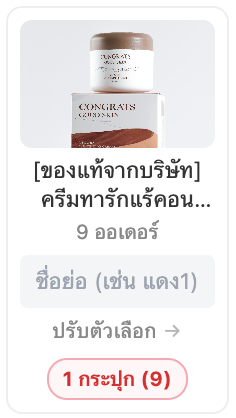
  <Step title="เลือกการ์ดสินค้าที่จะตั้งชื่อ">
    <Frame>
      <img src="https://mintcdn.com/shipflow/eAcy4YUne_QITe1q/images/%E0%B8%A0%E0%B8%B2%E0%B8%9E%E0%B8%96%E0%B9%88%E0%B8%B2%E0%B8%A2%E0%B8%AB%E0%B8%99%E0%B9%89%E0%B8%B2%E0%B8%88%E0%B8%AD-2569-05-16-%E0%B9%80%E0%B8%A7%E0%B8%A5%E0%B8%B2-07.09.36.png?fit=max&auto=format&n=eAcy4YUne_QITe1q&q=85&s=864e12bba78912f9b228d4386552554a" alt="ภาพถ่ายหน้าจอ 2569 05 16 เวลา 07 09 36" width="236" height="418" data-path="images/ภาพถ่ายหน้าจอ-2569-05-16-เวลา-07.09.36.png" />
    </Frame>
  </Step>

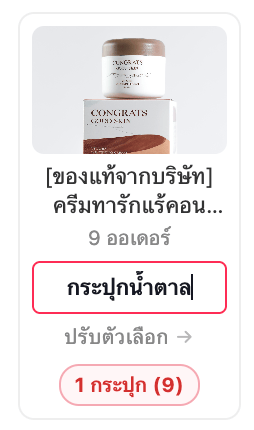
  <Step title="พิมพ์ชื่อลงช่อง &#x22;ชื่อย่อ&#x22;">
    เพื่อตั้งชื่อให้ตะกร้าหลักแบบด่วน

    <Frame>
      <img src="https://mintcdn.com/shipflow/eAcy4YUne_QITe1q/images/%E0%B8%A0%E0%B8%B2%E0%B8%9E%E0%B8%96%E0%B9%88%E0%B8%B2%E0%B8%A2%E0%B8%AB%E0%B8%99%E0%B9%89%E0%B8%B2%E0%B8%88%E0%B8%AD-2569-05-16-%E0%B9%80%E0%B8%A7%E0%B8%A5%E0%B8%B2-07.11.17.png?fit=max&auto=format&n=eAcy4YUne_QITe1q&q=85&s=86d48283c2000cb38614ff1ebaebb819" alt="ภาพถ่ายหน้าจอ 2569 05 16 เวลา 07 11 17" width="254" height="430" data-path="images/ภาพถ่ายหน้าจอ-2569-05-16-เวลา-07.11.17.png" />
    </Frame>
  </Step>

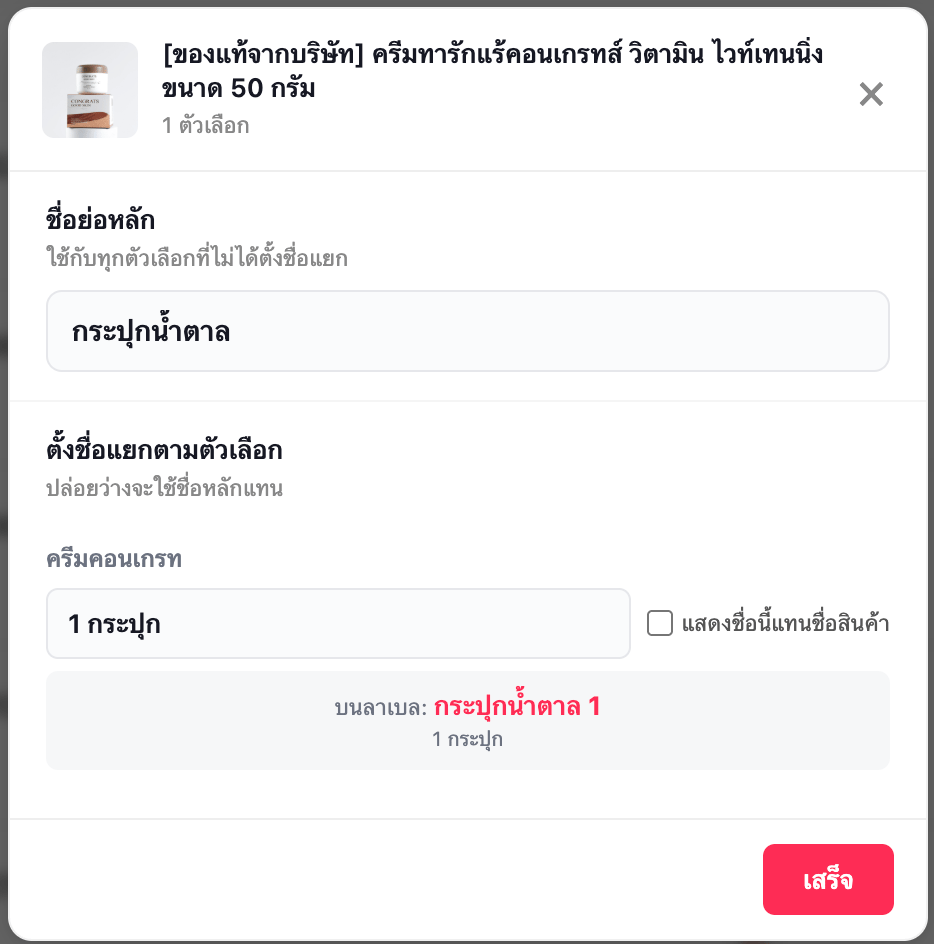
  <Step title="กด &#x22;ปรับตัวเลือก&#x22; จะเข้าหน้าต่างปรับแต่งแบบละเอียด">
    <Frame>
      <img src="https://mintcdn.com/shipflow/eAcy4YUne_QITe1q/images/%E0%B8%A0%E0%B8%B2%E0%B8%9E%E0%B8%96%E0%B9%88%E0%B8%B2%E0%B8%A2%E0%B8%AB%E0%B8%99%E0%B9%89%E0%B8%B2%E0%B8%88%E0%B8%AD-2569-05-16-%E0%B9%80%E0%B8%A7%E0%B8%A5%E0%B8%B2-07.12.21.png?fit=max&auto=format&n=eAcy4YUne_QITe1q&q=85&s=ea6389de9817d84e25e6bd3e0aac0a08" alt="ภาพถ่ายหน้าจอ 2569 05 16 เวลา 07 12 21" width="934" height="944" data-path="images/ภาพถ่ายหน้าจอ-2569-05-16-เวลา-07.12.21.png" />
    </Frame>

    * ชื่อย่อหลัก = ชื่อตะกร้าหลัก
    * ชื่อย่อตัวเลือกสินค้า มี 2 โหมด

          <CardGroup cols={2}>
            <Card title="โหมดต่อท้ายชื่อตะกร้า " icon="square">
              แสดงชื่อย่อตัวเลือกสินค้า ต่อจากชื่อของตะกร้าหลัก `กระปุกน้ำตาล / 1 กระปุก`
            </Card>

            <Card title="โหมดแสดงแทนชื่อตะกร้า" icon="square-check">
              ใช้ชื่อย่อของตัวเลือกสินค้า แทนที่ชื่อของตะกร้าหลัก และจะแสดงแค่บรรทัดเดียว
            </Card>
          </CardGroup>
    * ตรวจสอบตัวอย่างการแสดงชื่อบนลาเบล ก่อนกดปุ่ม "เสร็จ"
    * ด้านล่างมี preview ให้ดูว่าเวลาขึ้นบน label จะหน้าตาเป็นอย่างไร
  </Step>

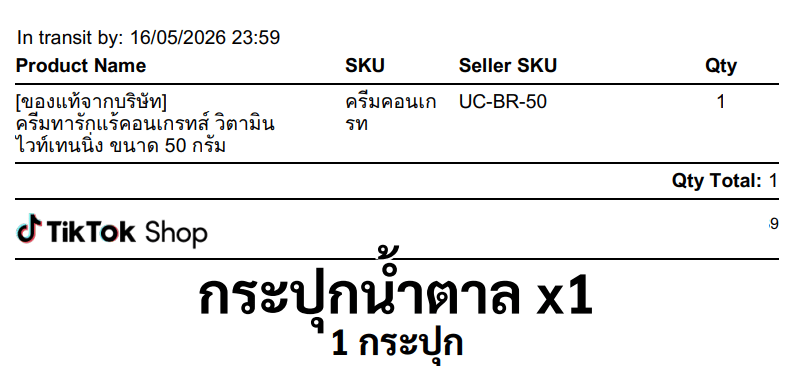
  <Step title="เมื่อสั่งพิมพ์ใบลาเบล จะมีรายละเอียดชื่อตะกร้าและชื่อตัวเลือกสินค้าแสดง">
    <Frame>
      <img src="https://mintcdn.com/shipflow/eAcy4YUne_QITe1q/images/%E0%B8%A0%E0%B8%B2%E0%B8%9E%E0%B8%96%E0%B9%88%E0%B8%B2%E0%B8%A2%E0%B8%AB%E0%B8%99%E0%B9%89%E0%B8%B2%E0%B8%88%E0%B8%AD-2569-05-16-%E0%B9%80%E0%B8%A7%E0%B8%A5%E0%B8%B2-07.16.01.png?fit=max&auto=format&n=eAcy4YUne_QITe1q&q=85&s=d5ac02aaa2d661a00db055c6d33593a2" alt="ภาพถ่ายหน้าจอ 2569 05 16 เวลา 07 16 01" width="792" height="366" data-path="images/ภาพถ่ายหน้าจอ-2569-05-16-เวลา-07.16.01.png" />
    </Frame>
  </Step>
</Steps>